Securing Oracle Integration Cloud APIs with Traefik on OKE
Introduction
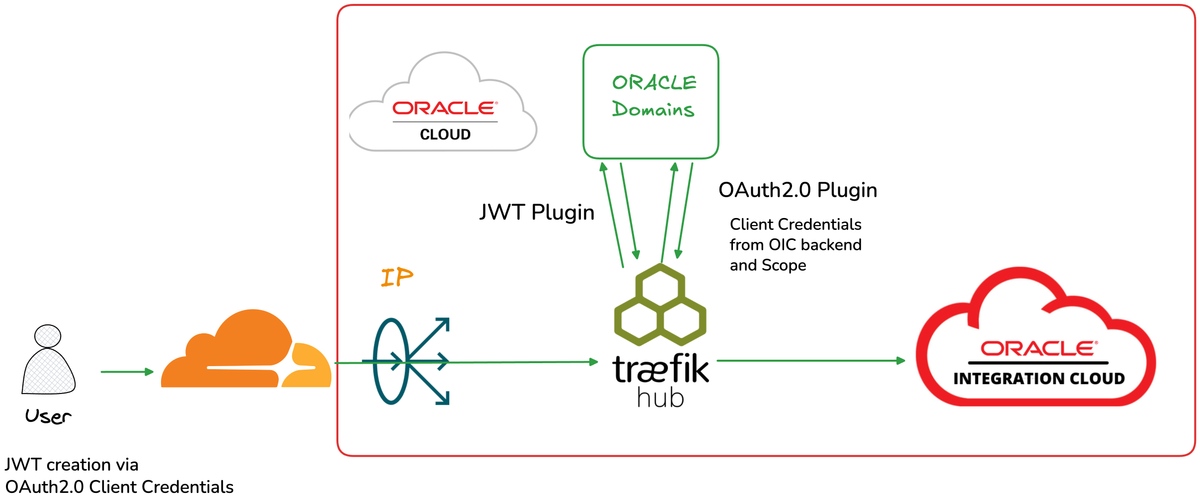
Organizations using Oracle Integration Cloud (OIC) often need to expose their integrations to external consumers while maintaining robust security. In this post, we'll explore how to deploy Traefik Hub as an API Gateway on Oracle Kubernetes Engine (OKE) to provide enterprise-grade security for OIC APIs.
This architecture enables:
- JWT validation for external client authentication via Oracle Identity Domains (IDCS)
- OAuth2.0 flow for secure backend communication with OIC
- Path rewriting to create clean, developer-friendly virtual endpoints
- Multi-layer security with flexible authentication options
Architecture Overview
How It Works
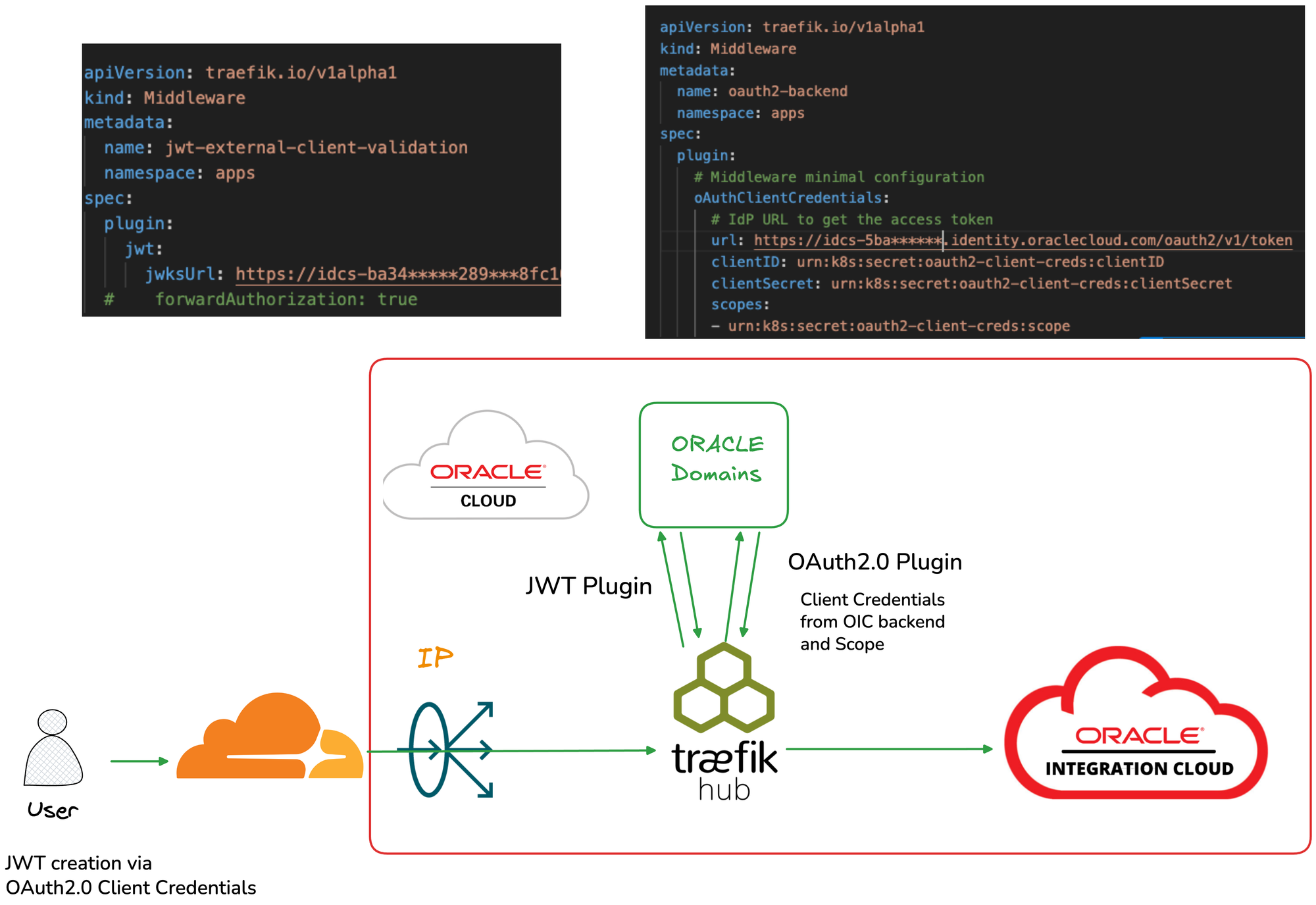
- External clients send requests with a JWT token obtained from Oracle Identity Domains
- Traefik Hub validates the JWT using the JWKS endpoint
- OAuth2.0 Plugin obtains a fresh access token for OIC
- Request is forwarded to OIC with the new backend token
- Path rewriting transforms clean API paths to OIC integration URLs
Why This Architecture?
The Challenge
Oracle Integration Cloud requires OAuth2.0 authentication for API access. Customers typically have their own identity providers and tokens. Or they don't want to share externally the OIC credentials. The challenge is bridging these two authentication realms securely.
The Solution
Traefik Hub acts as a security gateway that:
- Validates external JWT tokens - Ensures only authenticated clients can access your APIs
- Handles token exchange - Obtains OIC-specific tokens using stored credentials
- Abstracts complexity - External clients don't need to know about OIC authentication
- Provides observability - Full visibility into API traffic through Traefik Hub dashboard
Implementation Guide
Prerequisites
- Oracle Kubernetes Engine (OKE) cluster
- Traefik Hub license - get in contact with Traefik
- Oracle Integration Cloud instance
- Oracle Identity Domains (IDCS) configuration
Step 1: Deploy Traefik Hub on OKE
Deploy Traefik Hub using the OCI Marketplace Stack:
- Navigate to OCI Console → Marketplace → Search for "Traefik API Management"
- Launch the stack with your OKE cluster
- Configure the Helm values:
ingressRoute:
  dashboard:
    enabled: true
providers:
  kubernetesCRD:
    allowCrossNamespace: true
    allowExternalNameServices: true
Step 2: Create ExternalName Service for OIC
Define a Kubernetes service that points to your OIC instance:
apiVersion: v1
kind: Service
metadata:
  name: oic-backend
  namespace: apps
spec:
  type: ExternalName
  externalName: your-oic-instance.integration.oraclecloud.com
  ports:
    - port: 443
Step 3: Configure JWT Validation Middleware
Create a middleware to validate incoming JWT tokens against Oracle Identity Domains:
apiVersion: traefik.io/v1alpha1
kind: Middleware
metadata:
  name: jwt-external-client-validation
  namespace: apps
spec:
  plugin:
    jwt:
      jwksUrl: https://idcs-<your-domain>.identity.oraclecloud.com:443/admin/v1/SigningCert/jwk
This middleware:
- Fetches the JWKS (JSON Web Key Set) from Oracle Identity Domains
- Validates the signature of incoming JWT tokens
- Rejects requests with invalid or expired tokens
Step 4: Configure OAuth2.0 Client Credentials Middleware
Create a middleware for backend authentication with OIC:
apiVersion: traefik.io/v1alpha1
kind: Middleware
metadata:
  name: oauth2-backend
  namespace: apps
spec:
  plugin:
    oAuthClientCredentials:
      url: https://idcs-<your-domain>.identity.oraclecloud.com/oauth2/v1/token
      clientID: urn:k8s:secret:oauth2-client-creds:clientID
      clientSecret: urn:k8s:secret:oauth2-client-creds:clientSecret
      scopes:
        - urn:k8s:secret:oauth2-client-creds:scope
Important: Store credentials securely in Kubernetes Secrets:
apiVersion: v1
kind: Secret
type: Opaque
metadata:
  name: oauth2-client-creds
  namespace: apps
stringData:
  clientID: <your-client-id>
  clientSecret: <your-client-secret>
  scope: <your-oic-scope>
Security Note: The urn:k8s:secret: prefix tells Traefik Hub to read values from Kubernetes Secrets rather than embedding them in the middleware configuration.Step 5: Create Virtual Endpoint with Path Rewriting
Transform clean API paths to OIC integration URLs:
apiVersion: traefik.io/v1alpha1
kind: Middleware
metadata:
  name: virtualendpoint-oic
  namespace: apps
spec:
  replacePathRegex:
    regex: "^/echo(/.*)?$"
    replacement: "/ic/api/integration/v2/flows/rest/project/YOUR_PROJECT/YOUR_INTEGRATION/1.0$1"
This allows external clients to call /echo instead of the lengthy OIC integration path.
Step 6: Create the IngressRoute
Tie everything together with an IngressRoute:
apiVersion: traefik.io/v1alpha1
kind: IngressRoute
metadata:
  name: oic-api-route
  namespace: apps
spec:
  entryPoints:
    - websecure
  tls:
    certResolver: le
    domains:
      - main: "api.yourdomain.com"
  routes:
    - kind: Rule
      match: Host(`api.yourdomain.com`) && PathPrefix(`/echo`)
      services:
        - name: oic-backend
          port: 443
          passHostHeader: false
      middlewares:
        - name: virtualendpoint-oic
        - name: jwt-external-client-validation
        - name: oauth2-backend
Testing Your Setup
Obtain a Client Token
First, get a JWT token from Oracle Identity Domains:
curl -X POST \
  "https://idcs-<your-domain>.identity.oraclecloud.com/oauth2/v1/token" \
  -H "Content-Type: application/x-www-form-urlencoded" \
  -d "grant_type=client_credentials" \
  -d "client_id=<your-external-client-id>" \
  -d "client_secret=<your-external-client-secret>" \
  -d "scope=<your-scope>"
Call Your API
Use the obtained token to call your API:
curl "https://api.yourdomain.com/echo" \
  -H "Authorization: Bearer <your-jwt-token>"
Expected Flow
- Traefik Hub receives the request
- JWT middleware validates the token against JWKS
- OAuth2.0 middleware obtains a backend token
- Path is rewritten to the OIC integration URL
- Request is forwarded to OIC with the backend token
- Response is returned to the client
Conclusion
Deploying Traefik Hub as an API Gateway for Oracle Integration Cloud provides a powerful, secure, and flexible solution for enterprise API management. The combination of JWT validation for external clients and OAuth2.0 Client Credentials for backend authentication creates a robust security boundary while maintaining ease of use for API consumers.
Key benefits:
- Decoupled authentication - External clients don't need OIC credentials
- Centralized security - All authentication handled at the gateway
- Developer experience - Clean, simple API endpoints
- Enterprise ready - Production-grade security and observability
This blog post demonstrates a proof of concept for securing OIC APIs with Traefik Hub. Always review security configurations with your security team before deploying to production.