Talos Kubernetes on Proxmox with Traefik
Why This Matters
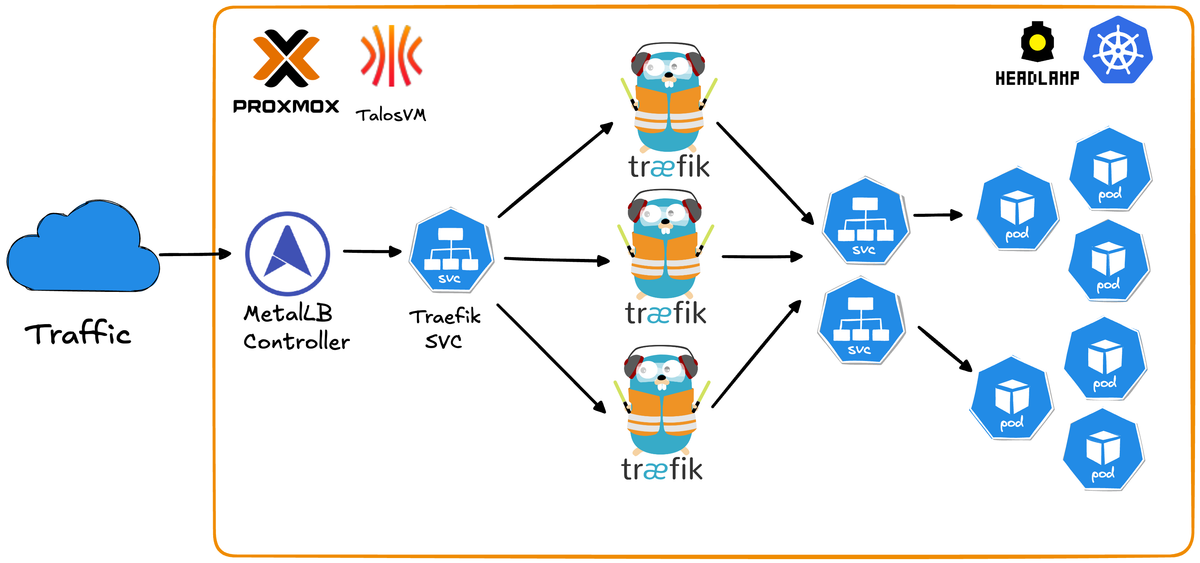
Running Kubernetes at home has traditionally meant dealing with the overhead of full Linux distributions, manual cluster setup, and the complexity of production-grade networking. This repository solves those pain points by leveraging Talos Linux a minimal, immutable, API-driven OS built specifically for Kubernetes - combined with Traefik for seamless ingress routing.
Problems this solves:
- No OS maintenance overhead - Talos is immutable and managed entirely via API
- Fully reproducible - Destroy and rebuild your entire cluster in minutes with simple scripts
- Production-grade networking - MetalLB LoadBalancer + Traefik ingress
- Automated workflows - Scripts handle VM creation, node provisioning, and cluster joining automatically
- Zero cloud costs - Kubernetes on your own hardware without monthly bills
- Secure by default - Minimal attack surface with no SSH, shell access, or unnecessary packages
- Built-in observability - Traefik dashboard and Headlamp UI for cluster management out of the box
Production-ready Kubernetes cluster using Talos Linux on Proxmox VE with Traefik ingress controller.
Features
- Immutable OS: Talos Linux provides API-driven infrastructure
- High Availability: Multi-node setup with MetalLB load balancing
- Ingress: Traefik with high availability load balancing
- Web UI: Headlamp dashboard for cluster management
- Automated: Scripts for quick worker node deployment

Prerequisites
- Proxmox VE running
- Talos ISO downloaded to Proxmox (default path: /var/lib/vz/template/iso/metal-amd64.iso)
- Available IP addresses for nodes in your network
- kubectl installed on your workstation
- Helm 3 installed on your workstation
First of all clone the Github repository
git clone https://github.com/traefik-workshops/traefik-on-prem-proxmox-talos1. Install talosctl
curl -sL https://github.com/siderolabs/talos/releases/latest/download/talosctl-$(uname -s | tr '[:upper:]' '[:lower:]')-$(uname -m | sed 's/x86_64/amd64/;s/aarch64/arm64/') -o ~/bin/talosctl
chmod +x ~/bin/talosctl
export PATH="$HOME/bin:$PATH"
2. Create Control Plane VM
Create VM in Proxmox UI or via CLI:
# On Proxmox server
# Adjust storage (local-lvm), bridge (vmbr0), and ISO storage (local) to match your setup
qm create 101 \
  --name talos-cp-1 \
  --memory 2048 \
  --cores 2 \
  --cpu x86-64-v2-AES \
  --sockets 1 \
  --numa 0 \
  --net0 virtio,bridge=vmbr0,firewall=1 \
  --scsihw virtio-scsi-single \
  --scsi0 local-lvm:32,iothread=1 \
  --ide2 local:iso/metal-amd64.iso,media=cdrom \
  --boot order=scsi0\;ide2\;net0 \
  --ostype l26

qm start 101
Note the VM's IP address from console.

3. Bootstrap Cluster
# Generate configs
talosctl gen config homelab-cluster https://<control-plane-ip>:6443

# Configure talosctl
export TALOSCONFIG=$(pwd)/talosconfig
talosctl config endpoint <control-plane-ip>
talosctl config node <control-plane-ip>

# Apply config
talosctl apply-config --insecure --nodes <control-plane-ip> --file controlplane.yaml

# Wait 60 seconds, then bootstrap
talosctl bootstrap

# Get kubeconfig
talosctl kubeconfig .
export KUBECONFIG=$(pwd)/kubeconfig

# Wait for control plane to be Ready (~60 seconds)
kubectl get nodes
# Node will show "NotReady" initially, wait until it shows "Ready"

# Keep these environment variables set for all following steps
echo "TALOSCONFIG: $TALOSCONFIG"
echo "KUBECONFIG: $KUBECONFIG"
4. Add Worker Nodes
Note: Ensure TALOSCONFIG environment variable is still set from Step 3.
Option A: Automated (Recommended)
# Setup SSH to Proxmox
scripts/setup-proxmox-ssh.sh <proxmox-ip>

# Add worker (replace <proxmox-node> with your Proxmox node name, usually 'pve')
scripts/add-talos-worker.sh -n talos-worker-1 -i <worker-ip> -p <proxmox-node> -v 201
Option B: Manual
# Create VM in Proxmox, then:
scripts/add-worker-manual.sh
# Enter worker IP when prompted
5. Install MetalLB
kubectl apply -f https://raw.githubusercontent.com/metallb/metallb/v0.14.5/config/manifests/metallb-native.yaml
kubectl wait --namespace metallb-system --for=condition=ready pod --selector=app=metallb --timeout=90s

# Update the IP range below to match your network
kubectl apply -f - <<EOF
apiVersion: metallb.io/v1beta1
kind: IPAddressPool
metadata:
  name: default-pool
  namespace: metallb-system
spec:
  addresses:
  - 192.168.1.200-192.168.1.250  # Change to your available IP range
---
apiVersion: metallb.io/v1beta1
kind: L2Advertisement
metadata:
  name: default
  namespace: metallb-system
spec:
  ipAddressPools:
  - default-pool
EOF
6. Install Traefik
helm repo add traefik https://traefik.github.io/charts
helm repo update

helm install traefik traefik/traefik --wait \
  --set ingressRoute.dashboard.enabled=true \
  --set ingressRoute.dashboard.matchRule='Host(`dashboard.localhost`)' \
  --set ingressRoute.dashboard.entryPoints={web} \
  --set providers.kubernetesGateway.enabled=true \
  --set gateway.listeners.web.namespacePolicy.from=All

kubectl apply -f - <<EOF
apiVersion: traefik.io/v1alpha1
kind: IngressRoute
metadata:
  name: traefik-dashboard
  namespace: default
spec:
  entryPoints:
  - web
  routes:
  - kind: Rule
    match: PathPrefix(\`/dashboard\`) || PathPrefix(\`/api\`)
    services:
    - kind: TraefikService
      name: api@internal
EOF

kubectl scale deployment traefik -n default --replicas=3  # Adjust replica count as needed
kubectl wait --namespace default --for=condition=ready pod -l app.kubernetes.io/name=traefik --timeout=60s

# Access at http://<external-ip>/dashboard/
kubectl get svc traefik 
7. Install Headlamp (Kubernetes UI)
helm repo add headlamp https://kubernetes-sigs.github.io/headlamp/
helm repo update

helm install headlamp headlamp/headlamp \
  --namespace kube-system \
  --create-namespace \
  --set config.baseURL=/headlamp \
  --wait

kubectl apply -f - <<EOF
apiVersion: traefik.io/v1alpha1
kind: IngressRoute
metadata:
  name: headlamp
  namespace: kube-system
spec:
  entryPoints:
  - websecure
  routes:
  - kind: Rule
    match: PathPrefix(\`/headlamp\`)
    services:
    - name: headlamp
      port: 80
  tls: {}
EOF

kubectl create token headlamp -n kube-system --duration=87600h > headlamp-token.txt
cat headlamp-token.txt

# Access at https://<external-ip>/headlamp/
# Login with token from headlamp-token.txt

Quick Reference
Access Points
- Traefik Dashboard: http://<external-ip>/dashboard/
- Headlamp: https://<external-ip>/headlamp/
Useful Commands
# Cluster status
kubectl get nodes
kubectl get pods -A

# Talos health
talosctl health
talosctl dashboard

# Scale workers
scripts/add-talos-worker.sh -n talos-worker-2 -i <ip> -p <proxmox-node> -v 202