Your Mock Requests Didn’t Break Production. Your Real Users’ Requests Did. Mirror Those into Non-Prod Environments.
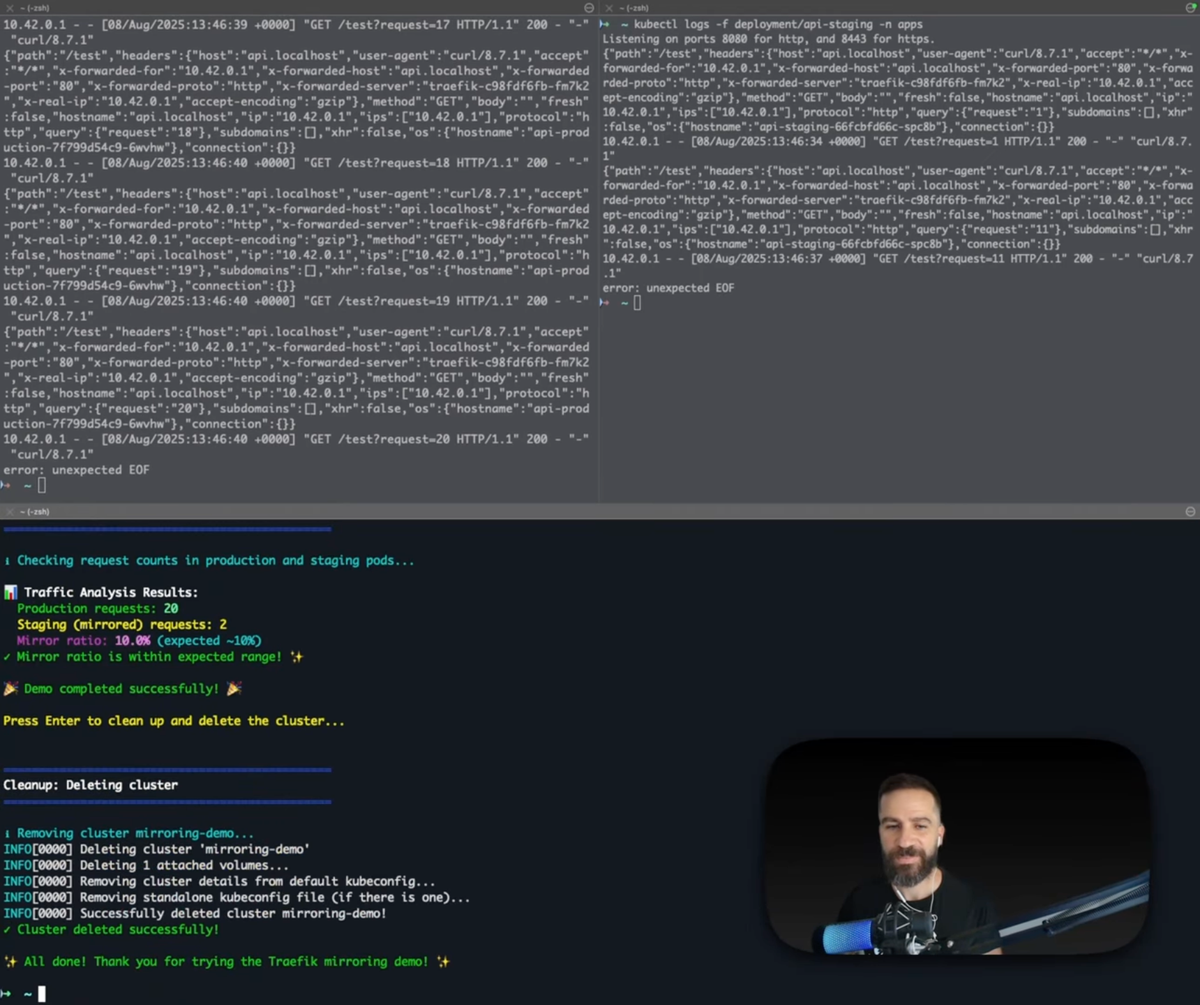
LIVE VIDEO DEMO - https://youtu.be/p8MHs0tlv5o?si=LivJoUf9RPbxibSg
When running APIs in production, one of the biggest challenges developers face is the gap between tests and real-world usage. No matter how much you simulate, mock requests and handcrafted test cases often fail to expose subtle, real-life problems that show up only under actual user traffic. Unexpected headers, weird payload encodings, or unusual request patterns can all cause your system to break — often in ways that slip past your tests.
This is where Traefik’s mirroring feature becomes powerful. It lets you safely replay a portion of live production requests into your development or staging environments. You get to test against real user traffic before it hits your customers.
In this article, we’ll explain how mirroring works in Traefik, explore why it matters from both a technical and a practical standpoint, share a customer’s firsthand experience, provide best practices, and finish with detailed instructions on how to test it yourself in Kubernetes.
Why Mirroring Matters
Developers know that churn between writing code, testing it, and deploying to production is a continuous process. But the testing environments we create are only as good as the inputs we feed them. Even detailed mocks and API contracts rarely capture the full spectrum of what real users send.
Real traffic often includes:
- Unusual headers — sometimes from browsers, proxies, or legacy clients
- Payload edge cases — like unexpected encodings, formats, or missing fields
- Rare timing and sequencing — bursts, retries, or invalid sequences
- Authentication or authorization edge cases never encountered in manual tests
These can cause silent failures or crashes that show up after release, leading to firefighting, rollbacks, and unhappy users.
By mirroring real live traffic into dev or staging, you get to:
- Surface those rare bugs early
- Confirm fixes against actual load and payloads
- Avoid surprise breakages in production
- Test live schema or database migrations in a low-risk setting
- Give Q&A teams realistic data to tune tests and coverage
A Customer Story
A customer I recently spoke with implemented mirroring for precisely these reasons. They set up their TraefikService in Kubernetes to replay about 10% of production HTTP requests to a dedicated dev service.
The results were eye-opening:
- Bugs they never saw before showed up immediately: strange payloads caused serialization errors.
- Headers that lacked expected values triggered unexpected behavior.
- Debugging became proactive: Issues appeared in the mirrored service logs, sometimes hours or days before any customer complaints.
- Developers gained freedom: without risk to users, they added diagnostic logging and safely tested new schemas.
- Q&A teams worked smarter: real-world traffic gave them a baseline for test cases, replacing guesswork with real requests.
All this happened without impacting production performance or customers' experiences. Since mirrored requests are independent duplicates, they never affect main response paths.
This perfectly sums up how mirroring closes the gap between “works on my machine” and “works in production.”
How Mirroring Works in Traefik
Traefik uses Kubernetes Custom Resources (TraefikService) to orchestrate traffic mirroring alongside regular routing. This lets you transparently clone requests from your primary backend to one or more mirror destinations.
Key points about Traefik mirroring:
- The original service receives 100% of the live traffic and handles all responses.
- The mirror services receive copies of requests, typically a configurable percentage, but do not impact responses or production flow.
- Mirrored requests can go to any compatible Kubernetes service or another TraefikService, making complex testing scenarios possible.
- Traefik buffers mirrored requests if necessary, and you can control body size limits to manage performance overhead.
Example Kubernetes YAML snippet:
apiVersion: traefik.io/v1alpha1
kind: TraefikService
metadata:
  name: mirror-setup
  namespace: my-namespace
spec:
  mirroring:
    name: prod-service           # Primary service receiving live user traffic
    namespace: my-namespace
    port: 80
    mirrors:
      - name: dev-backend        # Mirror target for testing
        namespace: my-namespace
        port: 80
        percent: 10              # 10% of requests mirrored
Performance and Safety Considerations
- Mirroring adds some overhead, but Traefik’s efficient design ensures this impact is minimal if you start with low percentages.
- Mirrored requests do not produce responses, so they never delay or affect the user-facing flow.
- Monitor CPU and memory on your mirror backends — unexpected crashes or high load will surface early.
- Use rate limiting or scaling on mirror services to handle bursts without failure.
- Logs from mirror services are your eyes into real traffic issues — invest in centralized logging and alerting.
Best Practices
- Start small: Mirror 5-10% of traffic initially, especially if your dev environment has limited capacity.
- Monitor and alert: Set up metrics on error rates and latencies in both main and mirror services.
- Use mirrors for experimental features or schema upgrades: Failures here don’t impact users.
- Iterate test coverage and automated scenarios based on mirror data: This builds stronger quality over time.
- Document your mirror config and train your team: It’s a powerful tool when you know how to use it effectively.
Testing Traefik Mirroring in Kubernetes
Want to try this out yourself? Here’s a step-by-step setup for testing Traefik mirroring in a local Kubernetes cluster using k3d. This example deploys simple HTTP echo services for production and staging, sets up mirroring, and validates traffic distribution by watching logs.
Setup Instructions
- Create a k3d cluster with Traefik enabled
k3d cluster create mirroring-demo \
  --image rancher/k3s:v1.32.7-k3s1 \
  --port "8080:80@loadbalancer" \
  --port "8443:443@loadbalancer"

kubectl wait --for=condition=Ready nodes --all --timeout=300s
2. Create the apps namespace
kubectl create namespace apps3. Deploy production and staging echo services
Save and apply this manifest:
cat <<EOF | kubectl apply -f -
apiVersion: apps/v1
kind: Deployment
metadata:
  name: api-production
  namespace: apps
  labels:
    app: api-production
spec:
  replicas: 1
  selector:
    matchLabels:
      app: api-production
  template:
    metadata:
      labels:
        app: api-production
    spec:
      containers:
      - name: http-echo
        image: mendhak/http-https-echo:37
        ports:
        - containerPort: 8080
        env:
        - name: HTTP_PORT
          value: "8080"
        - name: SERVICE_NAME
          value: "PRODUCTION-API"
        - name: ENV
          value: "production"
        - name: ECHO_BACK_TO_CLIENT
          value: "false"
        - name: LOG_WITHOUT_NEWLINE
          value: "false"
---
apiVersion: v1
kind: Service
metadata:
  name: api-production
  namespace: apps
spec:
  selector:
    app: api-production
  ports:
  - port: 80
    targetPort: 8080
---
apiVersion: apps/v1
kind: Deployment
metadata:
  name: api-staging
  namespace: apps
  labels:
    app: api-staging
spec:
  replicas: 1
  selector:
    matchLabels:
      app: api-staging
  template:
    metadata:
      labels:
        app: api-staging
    spec:
      containers:
      - name: http-echo
        image: mendhak/http-https-echo:37
        ports:
        - containerPort: 8080
        env:
        - name: HTTP_PORT
          value: "8080"
        - name: SERVICE_NAME
          value: "STAGING-API"
        - name: ENV
          value: "staging"
        - name: ECHO_BACK_TO_CLIENT
          value: "false"
        - name: LOG_WITHOUT_NEWLINE
          value: "false"
---
apiVersion: v1
kind: Service
metadata:
  name: api-staging
  namespace: apps
spec:
  selector:
    app: api-staging
  ports:
  - port: 80
    targetPort: 8080
EOF
4. Create the TraefikService to enable mirroring
cat <<EOF | kubectl apply -f -
apiVersion: traefik.io/v1alpha1
kind: TraefikService
metadata:
  name: api-mirror
  namespace: apps
spec:
  mirroring:
    name: api-production
    namespace: apps
    port: 80
    mirrors:
    - name: api-staging
      namespace: apps
      port: 80
      percent: 10
EOF
5 . Create IngressRoute referencing the mirroring service
cat <<EOF | kubectl apply -f -
apiVersion: traefik.io/v1alpha1
kind: IngressRoute
metadata:
  name: api-mirror-demo
  namespace: apps
spec:
  entryPoints:
  - web
  routes:
  - match: Host(\`api.localhost\`)
    kind: Rule
    services:
    - name: api-mirror
      namespace: apps
      kind: TraefikService
EOF
Testing the Mirroring Setup
- Watch pod logs side by side
kubectl logs -f deployment/api-production -n appskubectl logs -f deployment/api-staging -n apps2. Generate test traffic
(
  for i in {1..20}; do
    curl -s -H "Host: api.localhost" http://localhost:8080/test?request=$i > /dev/null
    sleep 0.3
  done
) &
3. Check traffic distribution
After traffic begins flowing, run:
echo "Checking request counts in production and staging pods..."

PROD_DEPLOYMENT=api-production
STAGING_DEPLOYMENT=api-staging
NAMESPACE=apps

# Count requests matching "/test" in both production and staging logs
PROD_COUNT=$(kubectl logs --since=30s deployment/${PROD_DEPLOYMENT} -n ${NAMESPACE} | grep -c "GET /test" || echo 0)
STAGING_COUNT=$(kubectl logs --since=30s deployment/${STAGING_DEPLOYMENT} -n ${NAMESPACE} | grep -c "GET /test" || echo 0)

echo ""
echo "📊 Traffic Analysis Results:"
echo "  Production requests: $PROD_COUNT"
echo "  Staging (mirrored) requests: $STAGING_COUNT"

if [ "$PROD_COUNT" -gt 0 ]; then
  RATIO=$(awk "BEGIN {printf \"%.1f\", $STAGING_COUNT * 100 / $PROD_COUNT}")
  echo "  Mirror ratio: $RATIO% (expected ~10%)"

  if awk "BEGIN {exit !($RATIO > 5 && $RATIO < 15)}"; then
    echo "Mirror ratio is within expected range! ✨"
  else
    echo "Mirror ratio is outside expected range"
  fi
else
  echo "No requests detected in production logs — check your setup."
fi
You should see approximately four times more requests in production than staging, matching the 10% mirror rate.
Conclusion
Mirroring real production traffic into non-prod environments is a practical, low-risk way to close the gap between assumed behavior and actual user patterns. Traefik’s Kubernetes integration makes enabling this relatively straightforward, and customers have seen real improvements in bug discovery, debugging speed, and deployment confidence.
If you’re struggling with “works on my machine” syndrome or want faster feedback loops from real data, consider setting up Traefik mirroring as part of your development lifecycle. Start small, watch your mirrored logs, and let real users guide your next release for fewer surprises downstream.
For a deeper dive, see Traefik’s official documentation on mirroring and TraefikService setup.